


Table of Contents
- Why Marine Battery Terminals Corrode So Fast
- How to Clean Boat Battery Terminals (Step by Step)
- Best Marine Battery Terminal Protector Options
- Marine Battery Maintenance Schedule: What to Check and When
- Battery Terminal Torque Specs and Sealant Compatibility
- Common Mistakes That Let Corrosion Come Back
- Frequently Asked Questions
Last Updated: September 30, 2026
Why Marine Battery Terminals Corrode So Fast
Battery terminal corrosion is the buildup of chemical compounds on and around your battery's connection points, and in a marine environment this battery terminal corrosion happens faster than almost anywhere else. Salt spray, constant moisture, and the vibration of a running engine all speed up the process. The result is a weak connection, hard starting, and a shorter battery life.
Galvanic Corrosion vs. Chemical Oxidation
technical guidance on stray current corrosion in boats notes that stray current can damage boat hardware within days, so it pays to test your electrical system, not just clean it.
How to Clean Boat Battery Terminals (Step by Step)
Cleaning boat battery terminals is a five-step job that takes about 20 minutes and costs almost nothing. Follow the order below, and always disconnect the negative cable first. The sequence matters more than the tools, reversing the disconnect order can arc a wrench across the positive post and the frame.
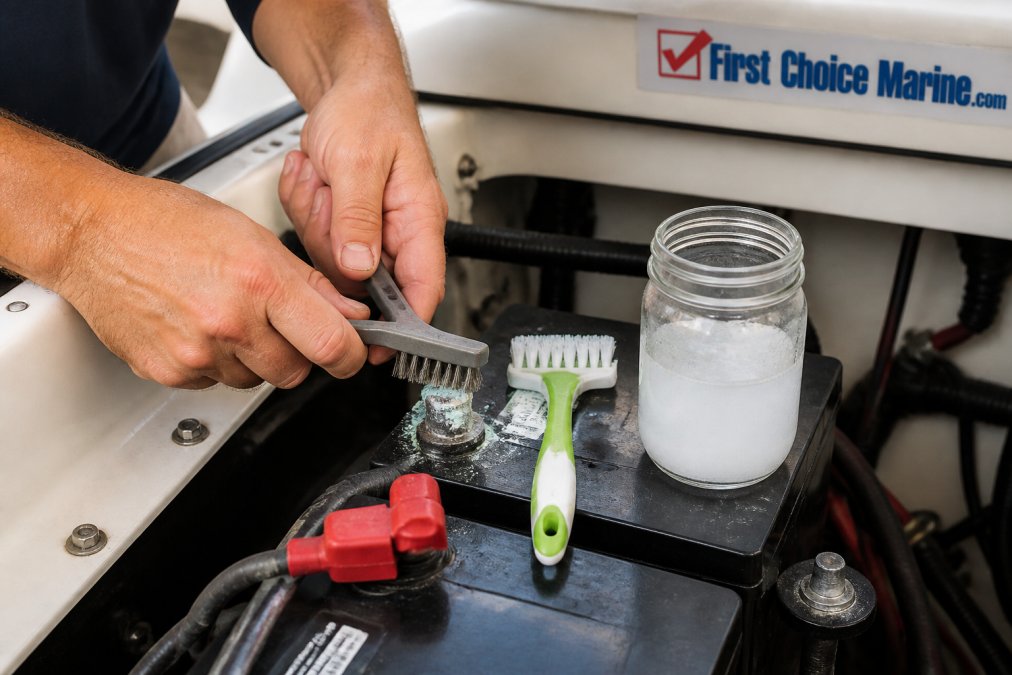
- Turn off the battery switch and remove the negative cable. Use a wrench that fits snugly, a 10mm or 1/2-inch is common on marine terminals, but check your clamp. Set the cable aside where it won't touch metal.
- Remove the positive cable. Keep the two cables apart so they can't bridge.
- Mix a baking soda solution. One tablespoon of baking soda per cup of water. This neutralizes sulfuric acid residue. You'll know it's working when the crust fizzes, that fizz is carbon dioxide leaving as the acid is neutralized.
- Scrub the terminal post and clamp with a wire brush or terminal brush. Work the paste into the crust until it stops fizzing. For heavy blue-green buildup, a dedicated terminal brush with internal and external bristles reaches the inside of the clamp where a flat wire brush can't.
- Rinse with clean water and dry completely. Any moisture left behind invites corrosion back. A compressed-air burst or a clean rag works; a hair dryer on low is fine if you're in a humid slip.
Match the Method to Your Battery Type
Terminal construction varies by chemistry, and the wrong tool damages the post:
- Flooded lead-acid: Standard lead posts. Wire brush and baking soda are safe. Expect the most acid fume exposure, these vent the most.
- AGM and gel: Sealed, so less acid fume, but the lead posts are often thinner. Use a lighter touch with the brush and skip aggressive scraping.
- Lithium (LiFePO4): Posts are typically stainless or nickel-plated inserts. Do not wire-brush these, use a nylon brush and isopropyl alcohol. Baking soda is unnecessary because there's no acid to neutralize, and abrasive scrubbing can strip the plating and start the galvanic problem you're trying to prevent.
Verify the Connection After Cleaning
Cleaning is only half the job, you need to confirm the connection is actually good. With the terminals reconnected and torqued (see the torque section below), set a multimeter to DC volts and measure from the battery post to the cable clamp while a load is on (running a bilge pump or turning on the nav lights works). A reading above about 0.1V means resistance is still high, the clamp or post is pitted and needs replacement, not another cleaning.
Tools and Supplies You'll Need
- A wrench set that fits your terminal clamps (10mm and 1/2-inch cover most marine batteries)
- A wire brush or dedicated terminal brush (nylon brush for lithium)
- Baking soda and a small cup
- Isopropyl alcohol for lithium or plated posts
- Clean water and a lint-free rag
- A multimeter for the post-to-clamp voltage check
- Safety glasses and gloves
- A corrosion inhibitor spray for after reassembly
Once the terminals are dry, apply a corrosion inhibitor before you reconnect. Reconnect the positive cable first, then the negative. If the post is pitted or the clamp won't tighten down on it, replace the cable, cleaning a damaged connection just delays the failure.
Best Marine Battery Terminal Protector Options
The best marine battery terminal protector is one that seals out moisture and salt while staying in place through vibration. Three products do this well, and each suits a different budget and use case.
Marine Battery Maintenance Schedule: What to Check and When
A marine battery maintenance schedule is a simple calendar that keeps corrosion from taking hold. Industry recommendations suggest checking battery connections every four to six months and before seasonal storage, according to marine battery maintenance guidance.
Here's a practical schedule to follow:
| Interval | Task | Why It Matters |
|---|---|---|
| Monthly (season) | Visual check for white or green crust | Catches oxidation early |
| Every 4-6 months | Clean and re-coat terminals | Stops buildup before it spreads |
| Before storage | Full clean, dry, and grease coat | Prevents winter corrosion |
| Spring launch | Torque check and voltage test | Confirms connection integrity |
| After rough water | Inspect for loosened clamps | Vibration loosens connections |
Add a terminal inspection to your pre-trip routine. It takes two minutes and can save a day on the water.
Battery Terminal Torque Specs and Sealant Compatibility
Torque and sealant choice matter more than most boaters realize, and this is where most guides stop short. Loose terminals create resistance and heat. Over-tightened terminals can crack the post or strip the clamp, and a cracked post on a sealed AGM or lithium battery means replacing the whole battery, not just the terminal.
Torque Values You Can Actually Use
Terminal torque depends on the post style, not the brand. These are the ranges most marine battery makers publish, and they're a safe starting point, always defer to the label on your specific battery:
| Terminal Style | Typical Torque | Notes |
|---|---|---|
| SAE post (lead, wing nut or bolt) | 50-70 in-lbs | Most common on flooded and AGM |
| Side terminal (3/8" bolt) | 70-90 in-lbs | Common on dual-purpose marine batteries |
| Stud terminal (M8 stainless) | 60-80 in-lbs | Typical on lithium LiFePO4 |
| Group 24/27/31 clamp bolt | 50-60 in-lbs | The clamp bolt, not the post |
Sealant Compatibility by Battery Type
This is the part most guides skip. The right sealant depends on what your battery vents and what its terminals are made of:
- Flooded lead-acid: Petroleum jelly (Vaseline) works as a basic barrier and is cheap, but it can soften some rubber and plastic components over time. Dielectric grease is the safer default, it's silicone-based, won't harm cable insulation, and stays put through vibration. Dedicated anti-corrosive sprays like Corrosion Block are formulated for electrical connections and won't interfere with conductivity.
- AGM and gel: These vent less acid, so oxidation is slower, but the terminals are often thinner lead. Dielectric grease is the standard choice. Avoid petroleum jelly here, the thinner posts are more prone to the softening issue, and AGM cases are more sensitive to petroleum-based products.
- Lithium (LiFePO4): No acid fumes, so the corrosion you're fighting is galvanic, not chemical. Use a dielectric grease rated for the terminal material (nickel-plated or stainless). Do not use petroleum jelly, it can attract dust and hold moisture against the plated surface. Some lithium makers specify a silicone-based terminal protector only.
The Order of Operations
Apply grease to the post after the clamp is torqued, not before. Greasing first puts an insulating layer between the clamp and the post, which raises resistance and defeats the purpose. Torque first, then coat the exposed post and the outside of the clamp.
Common Mistakes That Let Corrosion Come Back
Corrosion returns for predictable reasons. Fix these and your terminals stay clean far longer.
- Reconnecting onto a damp terminal. Any moisture under the clamp traps salt against the metal.
- Skipping the protective coat. Clean metal starts oxidizing the moment it's exposed to air.
- Mixing metals without isolation. A stainless fastener on an aluminum fitting invites galvanic corrosion.
- Ignoring electrolyte leakage. Acid weeping from a cracked case eats terminals from the inside out.
- Over-tightening clamps. This cracks posts and creates new leak paths.
- Cleaning without neutralizing. Rinsing alone leaves acid residue behind to restart the cycle.
Frequently Asked Questions
What is the best product to prevent battery terminal corrosion?
Two approaches work well. A spray-on protector such as Loctite-Permatex Battery Protector/Sealer ($8.93) stops terminal corrosion and can be applied in or out of storage. For heavier marine exposure, Corrosion Block 12 oz Aerosol ($32.60) uses polar bonding chemistry to penetrate corrosion cells and leave a clear hydrophobic film on battery terminals, connectors, and fuse panels. Many boaters apply a protector after every cleaning and reapply before seasonal storage.
Does dielectric grease prevent battery corrosion?
Dielectric grease creates a moisture barrier that keeps salt spray and humidity away from the terminal post, which slows corrosion. It does not stop corrosion that has already started, and it is not a conductor, so apply it after the connection is tight, not between the terminal and the cable lug. A thin coat on the assembled terminal and clamp is enough. Reapply whenever you clean the terminals or notice the coating wearing thin.
Why do marine battery terminals corrode so fast?
Salt spray, constant humidity, and stray current accelerate the process. Salt water on a terminal creates an electrolyte path that promotes galvanic corrosion between dissimilar metals, and stray current can damage hardware in days rather than months. Electrolyte leakage from the battery adds acid to the mix. The combination means a boat battery needs terminal cleaning and inspection far more often than a car battery kept in a dry garage.
How often should you check boat battery connections?
Industry guidance recommends inspecting battery connections every four to six months and before seasonal storage. Add a check before any long trip. During each inspection, look for white or blue-green crust, loose terminal clamps, swollen cables, and voltage drop across the connection. Clean and re-coat as needed, then confirm the terminal clamp is tight to the manufacturer's torque spec so vibration does not loosen it underway.
Corrosion never really stops trying, and a single missed season can mean a dead battery and a canceled trip. First Choice Marine carries the maintenance supplies that keep your electrical system healthy, backed by over 100 years of experience in marine hardware and a focus on repair over costly replacement. Shop corrosion inhibitors, terminal covers, and electrical solutions with free shipping, and keep your boat ready for the water. Sign in to your account to get started.
