


Last Updated: November 2, 2026
Quick Summary
Poor grounding gives electrical noise a path into sensitive marine electronics, causing screens to flicker, sonar to drop out, or GPS to lose its fix. Weak connections add resistance from corrosion or loose bolts, and the problems often come and go, making them hard to trace.
- Corroded ground terminals add resistance to the electrical path.
- Loose bolts create voltage drops that disrupt your electronics.
- Check each ground connection for green or white corrosion first.
- Measure voltage drop at the dock and again underway to locate the fault.
- Gather all ground wires onto a common busbar for one tidy connection point.
Table of Contents
- How Grounding Affects Marine Electronics Signal
- Common Signs Your Electronics Have a Grounding Problem
- How to Troubleshoot Boat Electrical Problems Step by Step
- Why Your Fish Finder Interferes When the Engine Is Running
- Measuring Marine Electronics Voltage Drop
- Finding and Fixing Boat Ground Wire Corrosion
- Next Steps for a Reliable Grounding Setup
- Frequently Asked Questions
How Grounding Affects Marine Electronics Signal
Marine electronics rely on a clean electrical path to work. When the ground connection is weak, your fish finder, GPS, or chartplotter can lose signal or act strangely. This is one of the most common and most overlooked causes of trouble on the water.
A ground connection gives electrical current a safe return path to the battery. If that path has resistance, corrosion, or loose connections, electrical noise can creep into your sensitive electronics. The result is often a screen that flickers, a sonar that drops out, or a GPS that loses its fix.
Poor grounding does not always break things outright. Often it causes intermittent problems that come and go, which makes them hard to track down.
- Corroded ground terminals add resistance
- Loose bolts create voltage drops
- Shared grounds can carry noise between devices
Common Signs Your Electronics Have a Grounding Problem
The signs are usually easy to spot once you know what to look for. Watch for these symptoms, especially when the engine is running.
- Screens that flicker or reset
- Sonar readings that jump or vanish
- GPS position that drifts or loses lock
- Radio static that changes with engine speed
- Devices that work at the dock but fail underway
Many boat owners blame the device itself. A quick check of the ground path often reveals the real problem.
How to Troubleshoot Boat Electrical Problems Step by Step
Work through these steps in order. Start with the simplest checks before you take anything apart.
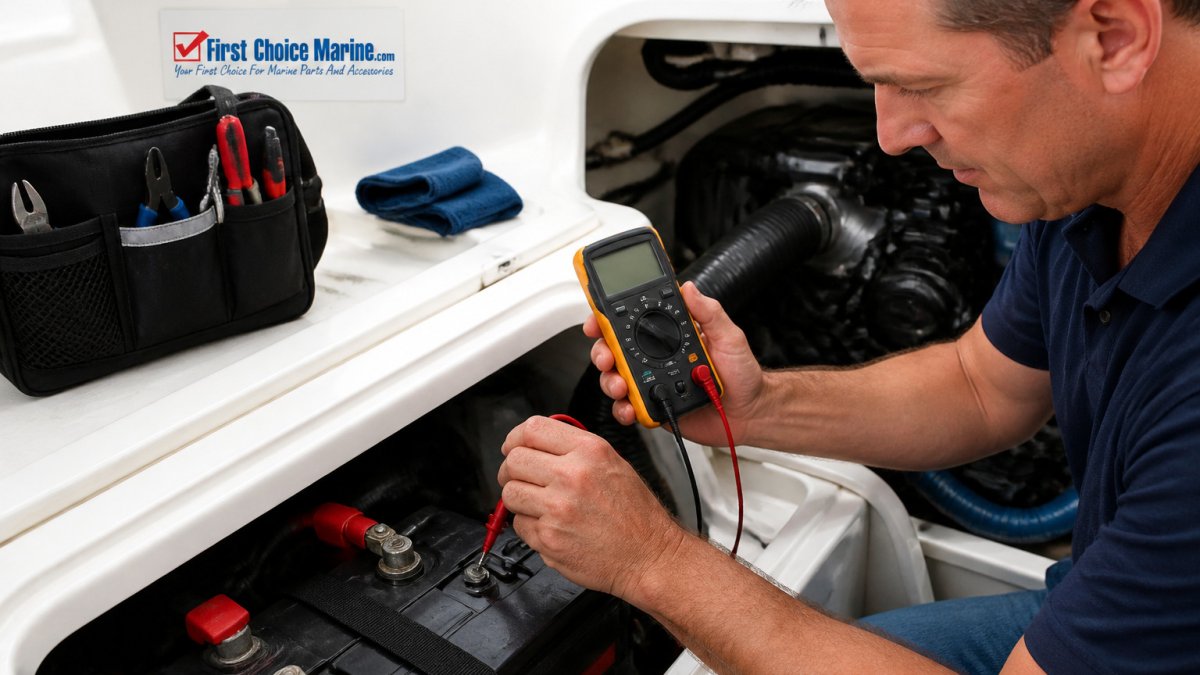
- Turn off all electronics and the engine.
- Visually inspect every ground connection for green or white corrosion.
- Tighten any loose ground bolts and terminals.
- Clean corroded connections with a wire brush.
- Test the voltage at each device with a digital multimeter.
- Retest with the engine running and note any changes.
A common mistake is skipping the visual check. Corrosion often looks minor on the surface but hides a high-resistance joint underneath.
Why Your Fish Finder Interferes When the Engine Is Running
Engine-related interference is a classic grounding symptom. The engine's alternator and ignition system produce electrical noise. If your fish finder shares a poor ground with the engine, that noise travels straight into the sonar display.
Some boaters try to fix this by removing ground connections entirely.
For network-based systems, a proper terminator also matters. The Bluewater NMEA 2000 Female Terminator 120 Ohm #2705-00-010 costs $17.56 and is designed to help keep the NMEA 2000 network signal stable.

The table below sums up the most common grounding symptoms and what each one usually points to.
| Symptom | Likely cause | Fix |
|---|---|---|
| Screen flickers or resets | Corroded ground terminals add resistance | Clean terminals with a wire brush |
| Sonar readings jump or vanish | Shared ground carries engine noise | Separate grounds and tighten bolts |
| GPS drifts or loses lock | Loose bolts create voltage drops | Tighten and retest with engine running |
| Static changes with engine speed | Alternator noise on a poor ground | Check and rebuild the ground path |
| Works at dock, fails underway | Connection fails under vibration and load | Inspect joints and measure voltage drop underway |
Measuring Marine Electronics Voltage Drop
Voltage drop tells you how much power is lost along a wire or connection. A healthy ground path should show very little drop. A large drop points to resistance, which often means corrosion or a loose joint.
Bluewater NMEA 2000 Female Terminator 120 Ohm #2705-00-010 →
To measure it, place your multimeter probes at the battery negative terminal and the device ground. Run the device at load and read the difference. Anything significantly higher than a very small drop deserves attention.
Check the reading at the dock and again underway. A change between those two readings often shows where the problem lives.
Finding and Fixing Boat Ground Wire Corrosion
Corrosion is the most common cause of poor grounding on older boats. Salt air and moisture work their way into terminals and turn them green or white.
Start by disconnecting the battery. Remove each ground terminal and inspect the wire and the lug. If the copper looks dark or crumbly, cut back to clean wire and install a new lug.
Once the connections are clean, gather all the ground wires onto a common busbar. A Blue Sea Minibus 100A Common Busbar gives you one tidy point to connect everything.
Next Steps for a Reliable Grounding Setup
Good grounding is a system, not a single fix. Clean connections, a proper busbar, and a careful review of your electronics network will prevent most signal problems.
Plan your upgrades before you buy.
Check your connections at the start of each season. Small problems caught early save you from losing signal far from shore.
At First Choice Marine, we stock a range of marine electronics and electrical components, including network terminators and busbars. Shop with confidence, and keep your electronics running the way they should.
Frequently Asked Questions
Can poor grounding cause marine electronics to lose signal?
Yes. A weak or corroded ground connection adds resistance and can introduce electrical noise into navigation, sonar, and radio equipment. Electronics may drop signal, show erratic readings, or reset intermittently. Testing the connections is the fastest way to confirm whether grounding is the cause.
Why does my fish finder lose signal when I start the engine?
Starting the engine draws a large current from the battery, which can cause voltage fluctuations and electrical noise on shared grounds. Sonar and fish finder units are sensitive to this noise and may lose the display or show interference lines. Check the fish finder's ground wire and the engine ground for corrosion or loose fittings, and confirm the unit is not sharing a poor ground path with the starter circuit.
How do I check the ground connection on a boat?
Turn off all electronics, then use a digital multimeter set to measure resistance or continuity. Place one probe on the electronics' ground wire terminal and the other on the battery negative terminal. A reading near zero ohms indicates a sound connection. Inspect the terminals for green or white corrosion, and wiggle each connection to check for looseness. Clean and tighten any connection that shows resistance or movement.
What voltage should a marine electronics system have?
A 12-volt marine system typically reads about 12.6 volts at rest with a fully charged battery and around 13.2 to 14.4 volts while the engine charges it. Readings that drop sharply under load, or that vary widely from one electronics device to another, point to voltage drop in the wiring or grounds. Measure voltage at the device terminals with the engine running and compare it to the battery reading to locate the drop.

